
Kentastic UK deposits and withdrawals
Minimums and payout times for each method, why credit cards are refused, and how deposit limits work on your account.
Payment methods, minimums and speed
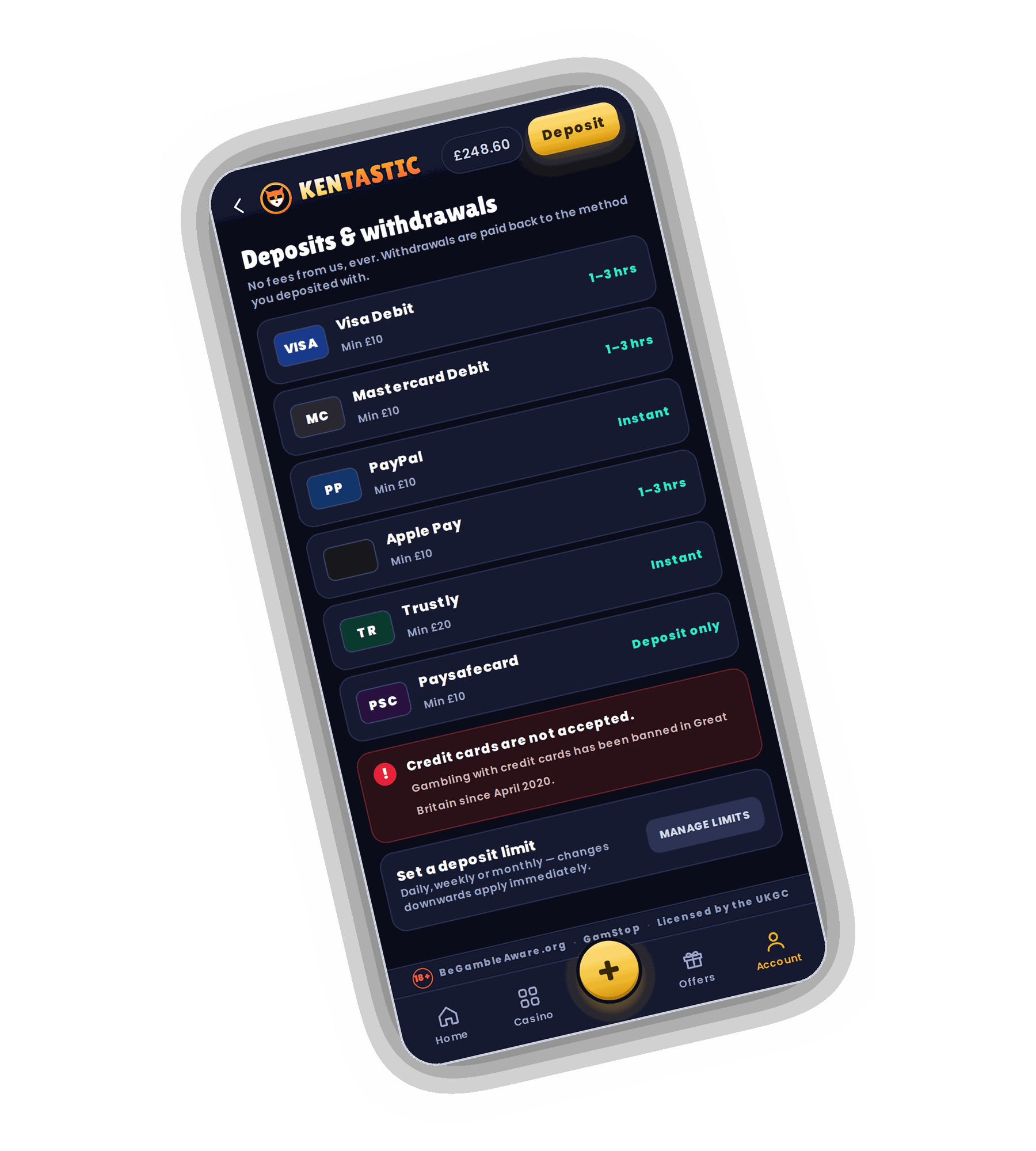
The Deposits and withdrawals screen opens with the line No fees from us, ever. Below it every method has a row with its minimum and its payout time. Withdrawals are paid back to the method you deposited with.
| Method | Minimum | Withdrawal time |
|---|---|---|
| Visa Debit | £10 | 1 to 3 hours |
| Mastercard Debit | £10 | 1 to 3 hours |
| PayPal | £10 | Instant |
| Apple Pay | £10 | 1 to 3 hours |
| Trustly | £20 | Instant |
| Paysafecard | £10 | Deposit only |
Trustly moves money straight from a UK bank account without a card, which is why its minimum is £20 rather than £10. Paysafecard vouchers are bought with cash, so they can fund an account but cannot receive a payout.
Why credit cards are refused
A red notice on the cashier reads Credit cards are not accepted. Gambling with credit cards has been banned in Great Britain since April 2020, and the rule covers credit cards used directly and through e-wallets. Visa and Mastercard debit cards are fine, as are PayPal and Apple Pay when they are linked to a debit card or a bank account.
Getting your winnings paid out
Debit card withdrawals land in 1 to 3 hours once your account is verified. PayPal payouts are usually instant. Kentastic takes no fee on any withdrawal, whatever the method or the amount.
The return route follows the deposit route. If you paid in by PayPal, winnings go back to the same PayPal account. If you used Paysafecard, add a debit card, PayPal or Trustly before you request a payout.
VIP players move up the queue. From Silver upwards, withdrawal priority means requests are handled in under 2 hours, 7 days a week.
A bonus still in play affects cashing out: asking for a withdrawal before the 35x wagering is complete removes the bonus and its winnings. Finish the wagering, or cancel the bonus, before you withdraw.
Setting a deposit limit
A Set a deposit limit panel sits at the bottom of the cashier with a Manage limits button. You can choose a daily, weekly or monthly cap. Changes that lower a limit apply immediately, so a new cap is active before your next deposit.
Limits live in your Account, next to reality checks, time outs and self exclusion.